
DRC-01C Notice for ITC Difference between GSTR-2B and GSTR-3B – Reply Format
Received a notice from the GST department? You’re not alone. The new automated system is flagging discrepancies, and Form DRC-01C is becoming a common sight for many businesses. This system-generated intimation is sent when there’s a mismatch in the Input Tax Credit (ITC) you’ve claimed. Specifically, the notice highlights an ITC difference between GSTR-2B and GSTR-3B, which is a critical compliance issue that demands your immediate attention. For a detailed overview, see our GST Notice for Traders – ITC Mismatch (GSTR-2B vs 3B) Complete Guide. Ignoring this notice is not an option, as it can lead to penalties, interest, and further legal action. A timely and accurate response is your best course of action. This comprehensive guide will walk you through a step-by-step process for analyzing the notice and provide a clear reply format for DRC-01C notice to help you resolve the matter efficiently.
Understanding the Core Issue: The ITC Difference Between GSTR-2B and GSTR-3B
At the heart of the DRC-01C notice is a simple conflict between two fundamental GST returns. The GST system is designed to match the ITC claimed by a buyer with the output tax paid by the seller. When your claimed credit doesn’t align with what the system sees as available to you, a red flag is raised. Understanding the roles of GSTR-2B and GSTR-3B is the first step in diagnosing the problem. This discrepancy can arise from various factors, ranging from simple clerical errors to timing differences in return filing by your suppliers. Pinpointing the exact reason for the GSTR-2B GSTR-3B discrepancies in India is crucial for drafting an effective response and ensuring your compliance record remains clean.
What are GSTR-2B and GSTR-3B? A Quick Refresher
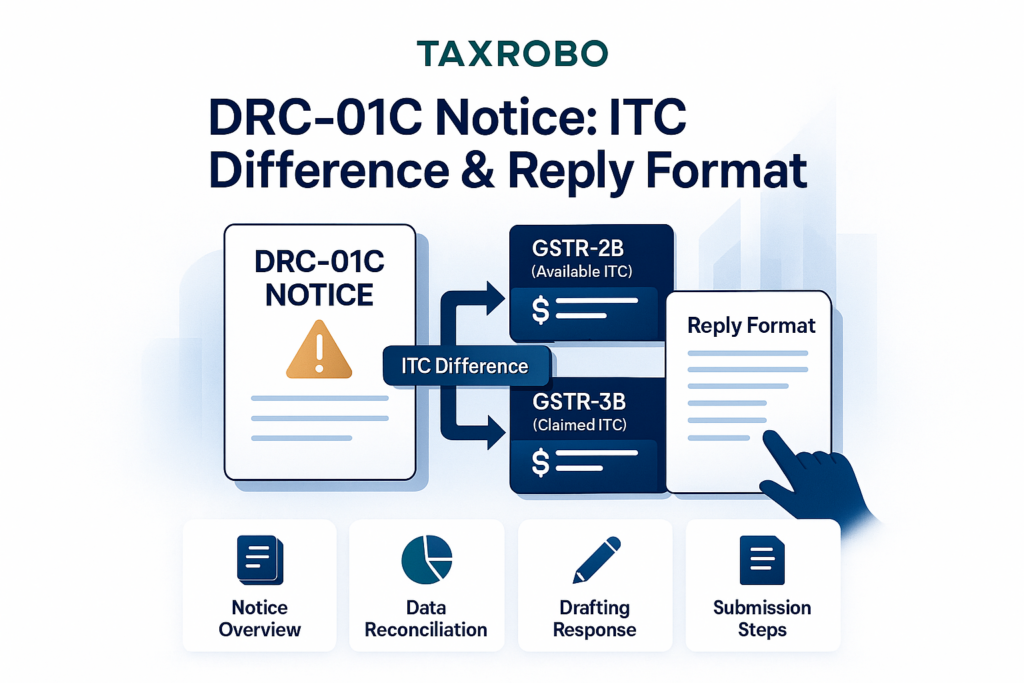
To understand the mismatch, let’s quickly define the two forms involved. Think of them as the ‘Rulebook’ and your ‘Declaration’.
- GSTR-2B (The ‘Rulebook’): This is a static, auto-drafted statement that the GST portal generates for you each month. It acts as a definitive list of the ITC that is available to your business. This statement is created based on the GSTR-1 (Return of Outward Supplies) and Invoice Furnishing Facility (IFF) returns filed by all your suppliers. Because it is auto-populated and cannot be edited, the GST department considers GSTR-2B the primary source of truth for determining your eligible ITC for a given tax period.
- GSTR-3B (Your ‘Declaration’): This is the monthly summary return that you, the taxpayer, file. In your GSTR-3B, you declare the summary of your sales, pay your final tax liability, and most importantly, claim the amount of eligible ITC you believe you are entitled to for that month. The ITC figure you enter in your GSTR-3B is what the system compares against the figure in your GSTR-2B.
Common Reasons for GSTR-2B GSTR-3B Discrepancies in India
The mismatch between these two forms is often due to legitimate reasons. Here are the most common causes you should investigate:
- Late Filing by Supplier: This is the most frequent reason. You may have filed your GSTR-3B by the 20th of the month, but your supplier filed their GSTR-1 after the due date. In this case, the invoice will not appear in your GSTR-2B for that month but will appear in the subsequent month.
- Incorrect Details in Supplier’s GSTR-1: Your supplier might have made a mistake while filing their return. This could be an error in your GSTIN, the invoice number, the invoice date, or the tax amount. Such errors prevent the invoice from appearing correctly in your GSTR-2B.
- ITC on Imports/SEZ Supplies: The Input Tax Credit on IGST paid for the import of goods is claimed based on the Bill of Entry. This credit is often not reflected in GSTR-2B in real-time, leading to a temporary mismatch.
- ITC from RCM (Reverse Charge Mechanism): You are required to pay GST on certain services under the Reverse Charge Mechanism and can claim ITC on that tax paid. This credit is self-declared in GSTR-3B and may not appear in GSTR-2B.
- Typographical Errors in Your GSTR-3B: A simple data entry mistake on your part, such as accidentally entering a higher ITC amount than you intended to claim, will trigger the notice.
- Transitional Credit: In rare cases, you might be claiming credit that pertains to a different period or credit that was transitioned from the pre-GST regime, which would not be part of your GSTR-2B.
Decoding Form DRC-01C: What This GST Notice Means for You
Receiving any notice from a tax authority can be unsettling, but it’s important to understand what Form DRC-01C is and, more importantly, what it is not. A helpful resource is our guide on How to Handle GST Notices – ASMT-10, DRC-01, DRC-07 Explained Simply. It is an automated intimation, not a show-cause notice or a demand order. It’s the system’s way of asking for a clarification regarding a discrepancy it has detected. This proactive approach by the department is designed to encourage self-correction and improve overall compliance without immediately resorting to punitive measures. Treating it as a request for information will help you approach the response process with a clear and methodical mindset.
What is Form DRC-01C?
Form DRC-01C is a system-generated intimation issued under CGST Rule 88D. Its purpose is to notify a taxpayer about a difference between the ITC claimed in their filed GSTR-3B and the ITC available in their auto-generated GSTR-2B. The notice is automatically triggered when the ITC claimed in GSTR-3B exceeds the available ITC in GSTR-2B by a pre-defined percentage or a specific monetary value set by the GST Council. The primary goal is to prompt the taxpayer to either pay the excess ITC claimed along with interest or explain the reason for the discrepancy. It is the first step in the compliance process, giving you an opportunity to reconcile your records and rectify any errors.
How to Read and Understand Your Notice
When you receive the DRC-01C notice, take a moment to carefully review its contents. The notice is divided into Part-A (the intimation from the department) and Part-B (where you provide your reply). Part-A will contain the following critical information:
- Reference Number (ARN): A unique number to identify the notice.
- Date of Issue: The date the notice was generated.
- Tax Period: The specific month or quarter for which the discrepancy has been flagged.
- The Exact Difference: The notice will clearly state the amount of ITC as per GSTR-2B, the amount you claimed in GSTR-3B, and the variance (the excess ITC claimed).
It is crucial to verify that all these details, especially the tax period and the amounts, match your internal records. This initial check will confirm the basis of the notice and set the stage for your reconciliation process.
Step-by-Step Guide to Responding to DRC-01C for ITC Difference
A structured approach is the best way to handle the notice. Follow these steps methodically to ensure you cover all bases and submit a comprehensive and accurate reply. Rushing the process can lead to an incomplete response, which might not satisfy the tax officer.
Step 1: Reconcile Your Data Immediately
Your first and most important action is to perform a detailed reconciliation. Don’t rely on memory or assumptions.
- Actionable Tip: Log in to the official GST Portal and navigate to the returns section. Download a copy of your GSTR-2B and your filed GSTR-3B for the specific tax period mentioned in the notice.
- Deep Dive: Use a spreadsheet program like Excel to conduct a line-by-line, invoice-by-invoice comparison. Create two columns: one for ITC claimed in your GSTR-3B workings and one for ITC available in GSTR-2B. This exercise will help you pinpoint the exact invoices that are causing the mismatch.
Step 2: Identify the Reason and Prepare Your Justification
Once you’ve identified the source of the mismatch from your reconciliation, you need to categorize the reason. Refer back to the “Common Reasons” list mentioned earlier. Was it a supplier’s late filing? An import? A typo?
- Actionable Tip: Once the reason is clear, gather all the necessary supporting documents that validate your claim. This evidence is the backbone of a successful DRC-01C notice response in India. Your explanation alone is not enough; you must prove your case.
- Examples of Documents: Scanned copies of Tax Invoices, Debit Notes, Proof of Payment to the supplier (bank statements), Bill of Entry for imports, RCM payment challans, and any email communication with your supplier regarding incorrect invoices.
Step 3: File Your Reply (Part-B of DRC-01C) on the Portal
After preparing your justification and compiling your documents, you are ready to file your response on the GST portal. The process is straightforward.
- Log in to the GST Portal and navigate to Services > Returns > Return Compliance.
- On the Return Compliance page, you will find an option for Form DRC-01C (Intimation of difference in ITC). Click on it.
- You can search for the notice using the Reference Number (ARN) or the tax period. Select the relevant notice to proceed.
- You will now see Part-B of the form, which presents you with two primary options for responding to DRC-01C for ITC difference:
- Option 1: Pay the difference. If your reconciliation shows that you have indeed claimed excess ITC by mistake, you should pay the differential amount along with applicable interest using Form DRC-03. After payment, choose this option and enter the ARN of the DRC-03 challan to close the notice.
- Option 2: Provide reasons. If you believe your ITC claim is correct and you have a valid reason for the discrepancy, select this option. A text box will appear where you can provide your detailed justification.
The Perfect Reply Format for DRC-01C Notice
The quality of your written response is critical. It should be clear, concise, and directly address the discrepancy. Avoid vague language. Structure your reply based on the specific reasons for the mismatch.
What to Write in the Justification Box
Here are some template-style examples you can adapt for your specific situation. Always be precise with details like amounts, invoice numbers, and GSTINs.
- Scenario 1 (Supplier’s Late Filing):
“The difference of INR [Amount] pertains to Invoice No. [XXX] dated [DD/MM/YYYY] from supplier [Supplier Name, GSTIN: YYY]. The supplier filed their GSTR-1 for the period on [Date of Filing], which was after our GSTR-3B filing date. The ITC is valid and is correctly reflecting in the GSTR-2B of the subsequent month, [Mention Subsequent Month]. A copy of the tax invoice is attached for your reference.”
- Scenario 2 (ITC on Imports):
“The excess ITC of INR [Amount] claimed in GSTR-3B is on account of IGST paid on the import of goods against Bill of Entry No. [XXX] dated [DD/MM/YYYY]. This credit is eligible as per Section 16 of the CGST Act but does not get auto-populated in GSTR-2B. A copy of the said Bill of Entry and the related e-payment challan is attached for your verification.”
- Scenario 3 (Typographical Error by Supplier):
“The discrepancy of INR [Amount] is due to an error made by our supplier [Supplier Name, GSTIN: YYY]. They incorrectly mentioned our GSTIN in Invoice No. [XXX] while filing their GSTR-1. We have already communicated this to the supplier, and they will amend this detail in their next GSTR-1 filing. Copies of the correct tax invoice and our communication with the supplier are attached.”
Attaching Supporting Documents
A reply without documentary evidence is significantly weaker. The portal allows you to upload supporting files.
- Ensure you attach clear, legible copies of all the documents you’ve gathered.
- You can combine multiple documents into a single PDF file for ease of uploading.
- Label your files clearly (e.g., “Invoice_XXX.pdf”, “Bill_of_Entry_YYY.pdf”).
Conclusion
Proactive monthly reconciliation is the best defense against receiving a GST notice. To learn more, read our guide on ITC Reconciliation: Importance and Best Practices for Businesses. Regularly comparing your purchase register with your GSTR-2B before filing GSTR-3B can help you identify and rectify issues before they are flagged by the department. However, if you do receive a DRC-01C notice, remember that a timely, well-documented, and clear reply is the key to resolving it without complications. Resolving the ITC difference between GSTR-2B and GSTR-3B is a critical compliance activity that safeguards your business from financial penalties and operational disruptions. Do not ignore this intimation, as the consequences of non-compliance are severe. They include the liability to pay the demanded amount with interest and penalties, and more critically, the potential blocking of your GSTR-1 filing for subsequent periods, which can halt your business operations.
Navigating GST notices can be complex. If you need expert assistance in handling your DRC-01C notice response in India or want to streamline your GST compliance to prevent such issues in the future, contact the specialists at TaxRobo today. We ensure your business stays compliant and stress-free.
FAQs on Responding to DRC-01C Notices
Q1: What is the time limit to respond to a DRC-01C notice?
A: You must furnish a reply in Part-B of Form DRC-01C, either by paying the differential amount or by providing reasons for the difference, within seven days of receiving the intimation. Failure to respond within this timeframe may lead to the initiation of demand and recovery proceedings by the tax officer.
Q2: What happens if I ignore the DRC-01C notice?
A: Ignoring a DRC-01C notice is a serious compliance lapse. If you fail to respond or pay the indicated amount within the stipulated seven days, the tax officer is empowered to initiate recovery proceedings under Section 73 (for non-fraud cases) or Section 75 of the CGST Act. Furthermore, as per Rule 59(6) of the CGST Rules, your ability to file Form GSTR-1 or use the Invoice Furnishing Facility (IFF) for subsequent tax periods may be blocked.
Q3: Can I claim ITC for an invoice that is not in my GSTR-2B?
A: As per Section 16(2)(aa) of the CGST Act, a crucial condition for claiming ITC is that the details of the invoice or debit note have been furnished by the supplier in their statement of outward supplies (GSTR-1 or IFF) and these details have been communicated to the recipient (i.e., they appear in your GSTR-2B). Claiming ITC for an invoice that is not reflected in your GSTR-2B is a direct violation of this condition and is the primary reason for receiving a DRC-01C notice.
Q4: If I pay the difference via DRC-03, do I still need to file a reply?
A: Yes, absolutely. Making the payment via Form DRC-03 is only the first part of the process. To formally close the notice, you must complete the second step. You need to log in to the portal, navigate to the DRC-01C form, select the option indicating you have paid the amount, and then enter the ARN (Application Reference Number) generated from your DRC-03 payment in Part-B of the form. Only after submitting this information is the compliance considered complete.