
A Step-by-Step Guide to Getting a Digital Signature Certificate (DSC) in India
Whether you’re filing your income tax returns, incorporating a new company, or bidding for an online tender, you’ve likely come across the term ‘Digital Signature Certificate’ or DSC. In our increasingly digital world, ensuring the authenticity and security of online documents and transactions is paramount. This comprehensive digital signature certificate guide is designed to walk you through the entire process smoothly, from understanding the basics to the final application steps. A DSC is essentially the electronic equivalent of your physical signature, serving as a digital proof of your identity. Understanding the importance of a digital signature certificate in India is crucial, as it provides legal validity to your online transactions under the Information Technology Act, 2000, making your digital interactions as authentic as a signed paper document.
What is a Digital Signature Certificate (DSC) and Why Do You Need One?
At its core, a Digital Signature Certificate is a secure digital key, issued by a Certifying Authority (CA), that validates your identity. It works using a technology called Public Key Cryptography, where two keys—a public key and a private key—are generated. The private key, which you keep secure, is used to sign documents, while the public key is used by the recipient to verify your signature’s authenticity. This technology provides three fundamental benefits that are critical for online business and legal compliance: Authenticity (proves you are who you say you are), Integrity (ensures the document has not been altered since it was signed), and Non-repudiation (prevents you from later denying that you signed the document).
The application of a DSC is vast and has become an indispensable tool for businesses and individuals across India. Here are some of the most common uses:
- Filing Income Tax Returns: Mandatory for businesses and individuals whose accounts need to be audited under the Income Tax Act.
- GST Registration and Filing: Required for GST registration, filing returns, and other compliances on the GST Portal.
- Ministry of Corporate Affairs (MCA) and ROC Filings: All forms submitted to the MCA, such as company incorporation documents and annual returns, must be digitally signed.
- Applying for Director Identification Number (DIN): A prerequisite for anyone wishing to become a director in a company.
- E-Tendering and E-Procurement: Essential for participating in online government and private sector tenders to ensure the security and confidentiality of bids.
- Registering Intellectual Property: Used when filing for Trademarks, Patents, and Copyrights to secure your intellectual assets.
- Signing Digital Documents: Legally signing invoices, contracts, and agreements in PDF format, eliminating the need for physical paperwork.
Understanding the Different Types of DSCs
Before you begin applying for a digital signature certificate in India, it’s vital to choose the right type based on your specific needs. The first step in this digital signature certificate application guide is to understand the classification, functionality, and validity of the different certificates available to digital signature certificate for Indians. Selecting the correct DSC ensures you meet the compliance requirements for the platforms you intend to use it on, avoiding any future hassles or the need to purchase another certificate.
Based on Class: Which One Do You Need?
- Class 3 DSC: This is the highest level of certificate available and offers the most robust security. It is issued only after the Certifying Authority has thoroughly verified the applicant’s identity and documents. In a significant update from the Controller of Certifying Authorities (CCA), Class 2 DSCs were discontinued in 2021. As a result, Class 3 is now the standard and only class of DSC issued for all purposes.
- Where is Class 3 Used?: A Class 3 DSC is used for a wide range of activities, including income tax filing, GST compliance, MCA/ROC filings, provident fund (PF) transactions, e-tendering, e-procurement, and signing digital documents. It provides the highest level of assurance and is universally accepted across all government and private platforms.
Based on Functionality: Signing vs. Encryption
- Signing DSC: This is the most common type of DSC and is used to digitally sign documents. Its primary function is to authenticate the signer’s identity and confirm their approval of the document’s contents. It is the type you would use for filing tax returns on the Income Tax India Website, submitting forms to the MCA, or signing legal agreements.
- Encryption DSC: This type of certificate is used to encrypt data, converting it into a secure, unreadable format. It is primarily required for platforms like e-tendering portals, where sensitive information (such as bid values) needs to be kept confidential until the tender opening date. You can also purchase a “Combo” DSC, which includes both signing and encryption functionalities in a single certificate.
Based on Validity
Digital Signature Certificates are issued with a limited period of validity, after which they must be renewed. You can choose from the following options based on your requirements and budget:
- 1 Year
- 2 Years
- 3 Years
Opting for a longer validity period, such as 2 or 3 years, is often more cost-effective in the long run. It saves you from the recurring administrative effort of renewal every year and ensures uninterrupted access to essential online services.
The Complete Digital Signature Certificate Guide: Your 5-Step Application Process
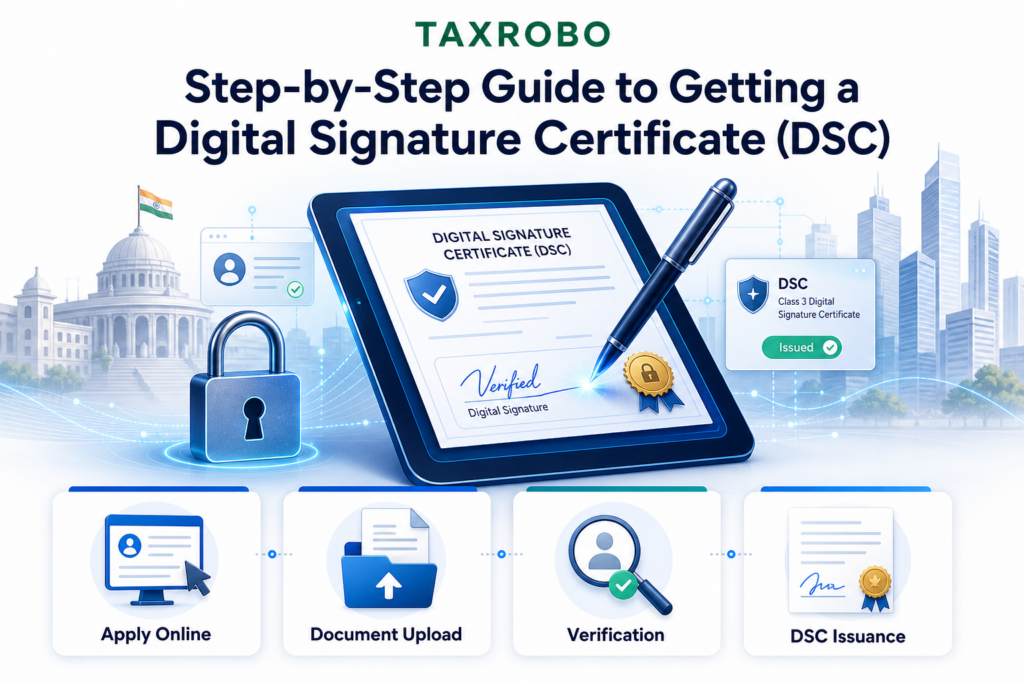
Navigating the application for a DSC can seem daunting, but it has become significantly simpler with modern paperless methods. This section provides a clear and actionable step-by-step digital signature process India, breaking down each stage to ensure you can get your certificate quickly and efficiently. Following these steps will help you understand all the key actions required to secure your digital identity.
Step 1: Choose a Licensed Certifying Authority (CA)
A Certifying Authority (CA) is a government-licensed entity with the authority to issue, suspend, and revoke Digital Signature Certificates. It is crucial to obtain your DSC from one of these recognized CAs to ensure its legal validity. Some of the most popular and trusted CAs in India include eMudhra, Capricorn, Sify, and NSDL. You can find a complete list of licensed CAs on the official website of the Controller of Certifying Authorities at CCA India.
Actionable Tip: You have two primary options: apply directly through the CA’s website or engage a trusted service provider like TaxRobo. Partnering with an expert team at TaxRobo can streamline the entire experience, offering guidance, document support, and ensuring your application is processed without any errors, saving you valuable time and effort.
Step 2: Prepare Your Documents – Digital Signature Certificate Requirements
The next step is to gather all the necessary documents. The digital signature certificate requirements vary slightly depending on whether you are applying as an individual or on behalf of an organization. Keeping these documents scanned and ready will expedite the application process.
For Individuals (Salaried Employees, Professionals)
- PAN Card Copy: A self-attested copy of your PAN card is mandatory for identity verification.
- Address Proof Copy: A self-attested copy of a valid address proof. This can be your Aadhaar Card, Voter ID, Passport, or Driving License.
- Photograph: One recent passport-sized photograph.
For Organizations (Companies, LLPs, Partnerships)
- Applicant’s Proofs: The PAN card and address proof of the authorized individual applying for the DSC.
- Organization’s PAN Card: A copy of the company’s or firm’s PAN card.
- Incorporation Documents: The Partnership Deed (for partnership firms), Certificate of Incorporation (for companies), or LLP Agreement (for LLPs).
- Proof of Business: A recent bank statement or a copy of the GST registration certificate.
- Authorization Letter: A Board Resolution (for companies) or an Authorization Letter authorizing the applicant to obtain the DSC on behalf of the organization.
Step 3: Complete the Online Application
Once you have chosen your CA or service provider, you will need to fill out the online application form on their website. This form will require you to enter your personal and contact details accurately. During this step, you will also need to select the specifics of the DSC you require:
- DSC Type: Class 3 (as it’s the only one available).
- Functionality: Choose between Signing, Encryption, or a Combo certificate.
- Validity: Select a 1, 2, or 3-year validity period.
Double-check all the information you provide to ensure it matches your supporting documents perfectly, as any discrepancy can lead to delays or rejection of your application.
Step 4: Complete Your Verification
Verification is the most critical part of the digital signing process in India, confirming your identity to the Certifying Authority. Thanks to modern technology, this process is now completely paperless and can be done from the comfort of your home or office.
- E-KYC Verification: The quickest method is through E-KYC, which can be done using your Aadhaar or PAN details. In an Aadhaar-based E-KYC, you authorize the CA to fetch your details from the UIDAI database via an OTP sent to your registered mobile number. This auto-fills your application and verifies your identity instantly.
- Video Verification: This is a mandatory step for all applicants. You will be required to record a short video clip through a link provided by the CA. During the video, you must clearly show your face, display your original PAN card and address proof to the camera, and read out a script that is displayed on the screen. Tips for a smooth video verification: Ensure you are in a well-lit room, have a stable internet connection, and speak clearly into the microphone.
Step 5: Download Your DSC
After you have successfully completed the online application and both E-KYC and video verifications, the Certifying Authority will review and approve your request. Once approved, you will receive an email and an SMS containing a secure link to download your Digital Signature Certificate.
Crucial Point: A DSC cannot be downloaded directly onto your computer. It must be downloaded onto a specific hardware device called a crypto USB token. This token looks like a standard pen drive but is a FIPS 140-2 level 2 certified hardware device designed to store your DSC securely. The CA or your service provider, like TaxRobo, will typically ship this pre-configured token to your registered address after your application is approved.
After You Get Your DSC: What’s Next?
Obtaining the DSC token is just the beginning. To start using it, you need to set it up correctly and understand its lifecycle, including the renewal process. Proper usage ensures you can carry out your digital transactions smoothly and without any technical glitches.
Installing and Using Your DSC
Before you can use your DSC, you need to install the drivers for the USB token on your computer. These drivers are usually provided by the CA on their website or may come with the token itself. Once installed, simply plug the token into a USB port on your computer. When you visit a government portal like the GST or Income Tax website and need to sign a document or form, a pop-up window will appear, prompting you to ‘Select Certificate’. You will choose your certificate from the list, enter the token’s password (which you set during the download process), and your document will be digitally signed.
DSC Renewal Process
Your DSC is valid only for the period you selected during the application (1, 2, or 3 years). It is essential to renew it before it expires to avoid any disruption to your work, especially if you rely on it for statutory filings or e-tendering. The renewal process is very similar to applying for a new DSC. You will need to complete the application and verification steps again. It is advisable to start the renewal process at least a week or two before the expiry date of your current certificate to ensure a seamless transition.
Conclusion
A Digital Signature Certificate is no longer a niche requirement but an essential tool for secure and legally compliant digital operations in India. For both small businesses and individuals, it simplifies processes, enhances security, and ensures adherence to regulatory requirements. By following the five key steps—choosing a CA, preparing documents, filling the online form, completing verification, and downloading the DSC—you can easily obtain this vital digital key. We hope this comprehensive digital signature certificate guide has clarified the process of applying for a digital signature certificate in India and empowered you to take the next step with confidence.
The DSC application process can seem complex, with its various technical and procedural nuances. Let the experts at TaxRobo handle it for you. We ensure a quick, paperless, and error-free experience, guiding you at every stage. Contact us today to get your Digital Signature Certificate with ease!
Frequently Asked Questions (FAQs)
1. How long does it take to get a Digital Signature Certificate?
With the modern paperless process involving E-KYC and video verification, the entire application and approval can be completed in as little as 15-30 minutes. Once approved, your DSC is ready for download on the same day, and the token is dispatched shortly after.
2. Can I use my DSC on multiple computers?
Yes. Since the Digital Signature Certificate is securely stored on a portable USB token, you can use it on any computer. You just need to plug the token into the USB port and ensure that the necessary token drivers are installed on that machine.
3. What is the difference between a digital signature and an electronic signature?
A digital signature is a specific, highly secure type of electronic signature. It uses public-key cryptography to encrypt the signature and validate the signer’s identity and the document’s integrity. An electronic signature is a broader term that can include anything from a typed name at the end of an email to a scanned image of a physical signature, which may not offer the same level of security or legal validity.
4. What should I do if I forget my DSC token’s password or lose the token?
If you forget the password for your USB token, it cannot be recovered due to security protocols. The token will be locked after a few incorrect attempts, and you will need to apply for a completely new DSC. If you lose the token, you must immediately contact your Certifying Authority to have the certificate revoked. This prevents any potential misuse. After revocation, you will have to go through the process of applying for a new DSC.